Full trial
Every feature is available without a monthly limit. The trial starts only after the first successful collection and game clan ID check.
جمع تلقائي وتحليلات واضحة للصناديق لعشائر Total Battle وTriumph.
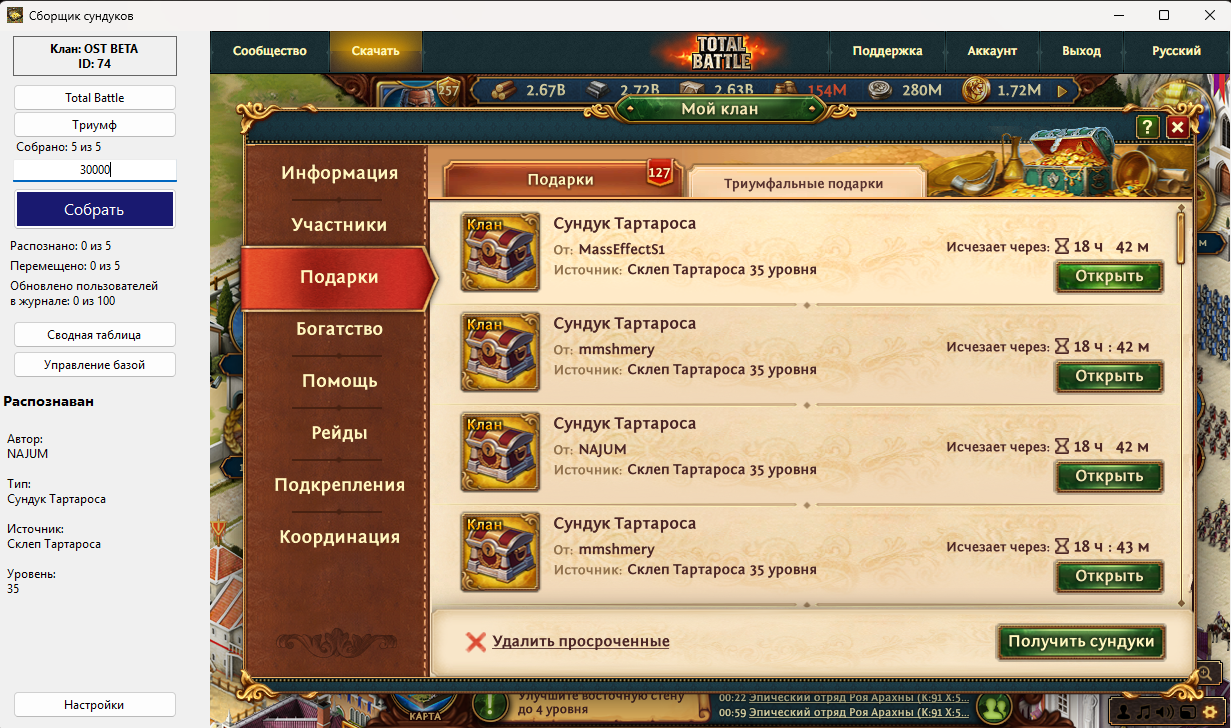
يؤتمت ChestMasterPro المسار من بيانات اللعبة إلى إحصاءات العشيرة الجاهزة. يجمع معلومات الصناديق واللاعبين ويحفظ سجلًا محليًا وينشئ ملخصًا ويزامنه مع clanplay.today من دون إرسال معرفات logId منفردة.
يتوفر الإصدار الحالي من ChestMasterPro لنظام Windows x64. تستمر الإصدارات القديمة المسموح بها في العمل، ويبقى التحديث خيار المستخدم.
جمع الصناديق تلقائيًا في الوضع 1 و3 وTOP
إدراك OCR للمؤلف، النوع، المصدر والمستوى
توحيد الأسماء المستعارة وإصلاح التكرارات عبر المترادفات
统括统计、玩家评级和报告导出
批量处理大量数据并保留本地历史记录
自动提交数据并控制进度
Windows 10/11 x64;建议8 GB 内存和全高清屏幕
ChestMaster does not force your clan to adapt to a service. You decide when to collect data, which chests to count, how many points to award, and who can see the results.
Create a clan in the app. The full trial starts after the first successful collection and game clan ID check.
Every feature is available without a monthly limit. The trial starts only after the first successful collection and game clan ID check.
If the limit is not exceeded during the trial, the free plan starts automatically when the trial ends.
If your clan exceeds 25,000 chests, switch to the paid plan and keep working without a monthly limit.
No complicated activation. Register or sign in directly in ChestMasterPro, then select an existing clan or create a new one.
Start for free →Run collection whenever it suits your clan: after a mass distribution, before the end of a cycle, or several times in a row. You do not depend on an external update schedule.
Every chest is linked to the game ID and profile of its player. Special characters, duplicate names, and renames do not turn into lost contributions.
Opened chests are saved to local history immediately. Even when moving quickly to the next chest, data already received remains counted.
ChestMaster is built for long lists and thousands of chests. Progress, speed, and the final total are visible while it works.
Player rankings, points, chest totals, target completion, might trends, player history, and reward composition are all in one place.
Create groups by source or name, include the level you need, assign your own points, and hide categories your clan has chosen not to count.
The primary history is stored locally in the app. The website adds shared viewing and management, while collection can continue independently and synchronize later.
Set one target for the whole clan or individual values for specific players. Settings are stored by cycle and do not alter past results.
Owners and moderators manage the clan, members see clear statistics, and a hidden clan can use a secret link that can be replaced at any time.
Collect when it suits you, count only what matters, and make decisions from the full history rather than isolated snapshots.
Try ChestMaster ↓جمع تلقائي وتحليلات واضحة للصناديق لعشائر Total Battle وTriumph. السعر: 1,000 ₽ و10.00 € و10.00 $ شهريًا
يمكنك تحميل البرنامج قبل الشراء. يتم التنشيط والدفع فقط في مكتبتك الشخصي.
قد يضع المتصفح علامة اشتباه على البرامج الجديدة أو قليلة التنزيل. اسمح فقط بالملف الذي تم تنزيله من موقع CLANPLAY الرسمي. لا تعطّل حماية المتصفح بالكامل.
افتح التنزيلات (Ctrl+J)، وابحث عن الملف، واختر «الاحتفاظ» أو «تنزيل الملف المشبوه»، ثم أكّد.
افتح التنزيلات (Ctrl+J)، واختر «…» بجانب الملف ← «الاحتفاظ» ← «إظهار المزيد» ← «الاحتفاظ على أي حال».
افتح قائمة التنزيلات، وحدد الملف المحظور، ثم اختر «السماح بالتنزيل» أو «فتح».
بعد التنزيل، انقر بزر الماوس الأيمن على الأرشيف ← خصائص ← إلغاء الحظر ← تطبيق، إذا ظهر الخيار.
⚠ إذا أبلغ المتصفح أو برنامج مكافحة الفيروسات عن تهديد محدد، فلا تشغّل الملف واتصل بدعم CLANPLAY.
فريق CLANPLAY سيجيب، وسيكون الإجابات المفيدة متاحة لزوار آخرين.
لا توجد أسئلة معلنة بعد. كن أول.