Full trial
Every feature is available without a monthly limit. The trial starts only after the first successful collection and game clan ID check.
Automatisch verzamelen en duidelijke kistanalyses voor clans in Total Battle en Triumph.
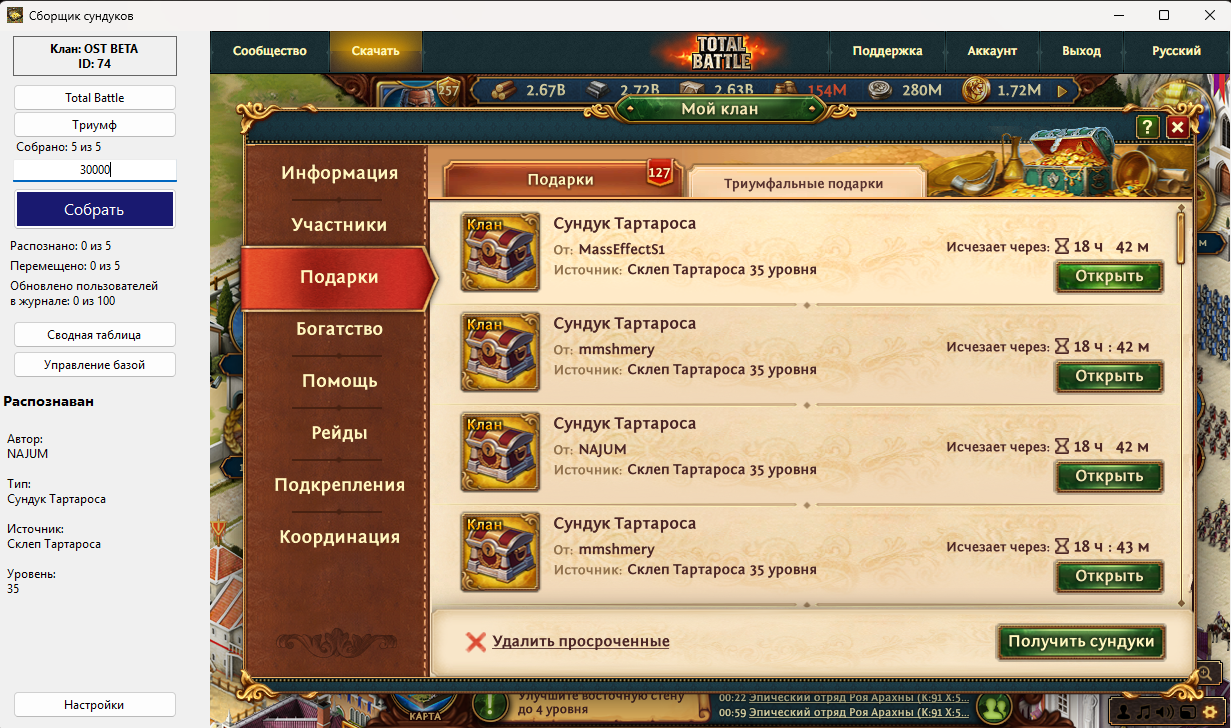
ChestMasterPro automatiseert het traject van spelgegevens naar kant-en-klare clanstatistieken. Het programma verzamelt informatie over kisten en spelers, bewaart lokale geschiedenis, maakt een overzicht en synchroniseert dit met clanplay.today zonder afzonderlijke logIds te verzenden.
De huidige ChestMasterPro-versie voor Windows x64 is beschikbaar. Oudere toegestane versies blijven werken; bijwerken blijft de keuze van de gebruiker.
Automatische kistcollectie in modi 1, 3 en TOP
OCR-herkenning van auteur, type, bron en niveau
Nimtoevoeging van nicknames en corrigeren van duplicaten via synoniemen
Samenvatting van statistieken, spelerbeoordelingen en rapportexport
Massa-verwerking van grote hoeveelheden en lokale geschiedenis
Automatische gegevensopgave en voortgangsbewerking
Windows 10/11 x64; aanbevolen 8 GB RAM en Full HD
ChestMaster does not force your clan to adapt to a service. You decide when to collect data, which chests to count, how many points to award, and who can see the results.
Create a clan in the app. The full trial starts after the first successful collection and game clan ID check.
Every feature is available without a monthly limit. The trial starts only after the first successful collection and game clan ID check.
If the limit is not exceeded during the trial, the free plan starts automatically when the trial ends.
If your clan exceeds 25,000 chests, switch to the paid plan and keep working without a monthly limit.
No complicated activation. Register or sign in directly in ChestMasterPro, then select an existing clan or create a new one.
Start for free →Run collection whenever it suits your clan: after a mass distribution, before the end of a cycle, or several times in a row. You do not depend on an external update schedule.
Every chest is linked to the game ID and profile of its player. Special characters, duplicate names, and renames do not turn into lost contributions.
Opened chests are saved to local history immediately. Even when moving quickly to the next chest, data already received remains counted.
ChestMaster is built for long lists and thousands of chests. Progress, speed, and the final total are visible while it works.
Player rankings, points, chest totals, target completion, might trends, player history, and reward composition are all in one place.
Create groups by source or name, include the level you need, assign your own points, and hide categories your clan has chosen not to count.
The primary history is stored locally in the app. The website adds shared viewing and management, while collection can continue independently and synchronize later.
Set one target for the whole clan or individual values for specific players. Settings are stored by cycle and do not alter past results.
Owners and moderators manage the clan, members see clear statistics, and a hidden clan can use a secret link that can be replaced at any time.
Collect when it suits you, count only what matters, and make decisions from the full history rather than isolated snapshots.
Try ChestMaster ↓Automatisch verzamelen en duidelijke kistanalyses voor clans in Total Battle en Triumph. Prijs: 1.000 ₽, € 10,00, $ 10,00 / maand
Je kunt het programma downloaden vooraf. Activering en betaling worden alleen uitgevoerd in je persoonlijk kabinet.
Browsers kunnen nieuwe of weinig gedownloade software als verdacht markeren. Sta alleen bestanden van de officiële CLANPLAY-website toe. Schakel browserbeveiliging niet volledig uit.
Open Downloads (Ctrl+J), zoek het bestand, kies “Behouden” of “Verdacht bestand downloaden” en bevestig.
Open Downloads (Ctrl+J), kies “…” naast het bestand → “Behouden” → “Meer weergeven” → “Toch behouden”.
Open de downloadlijst, selecteer het geblokkeerde bestand en kies “Download toestaan” of “Openen”.
Klik na het downloaden met rechts op het archief → Eigenschappen → Blokkering opheffen → Toepassen, indien beschikbaar.
⚠ Als de browser of antivirus een specifieke bedreiging meldt, voer het bestand dan niet uit en neem contact op met CLANPLAY-support.
Het CLANPLAY-team zal reageren en nuttige antwoorden zullen beschikbaar zijn voor andere bezoekers.
Nog geen gepubliceerde vragen. Wees de eerste.