Full trial
Every feature is available without a monthly limit. The trial starts only after the first successful collection and game clan ID check.
Automatic collection and clear chest analytics for Total Battle and Triumph clans.
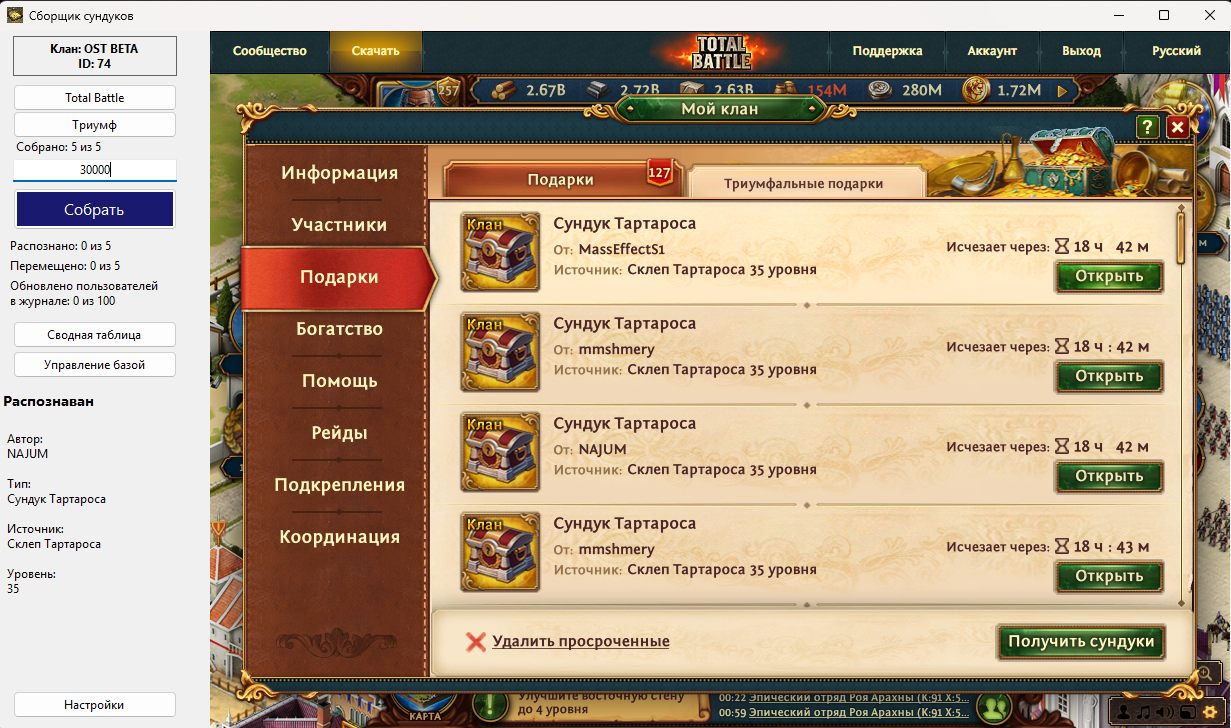
ChestMasterPro automates the path from game data to ready-to-use clan statistics. It collects chest and player information, keeps a local history, creates a summary, and synchronizes it with clanplay.today without sending individual logIds.
The current ChestMasterPro version for Windows x64 is available. Older allowed versions continue to work; updating remains the user's choice.
Automatic chest collection in modes 1, 3, and TOP
OCR recognition of author, type, source, and level
Unification of nicknames and correction of duplicates via synonyms
Summary statistics, player ratings, and report export
Batch processing of large volumes and local history
Automatic data submission and progress control
Windows 10/11 x64; recommended 8 GB RAM and Full HD
ChestMaster does not force your clan to adapt to a service. You decide when to collect data, which chests to count, how many points to award, and who can see the results.
Create a clan in the app. The full trial starts after the first successful collection and game clan ID check.
Every feature is available without a monthly limit. The trial starts only after the first successful collection and game clan ID check.
If the limit is not exceeded during the trial, the free plan starts automatically when the trial ends.
If your clan exceeds 25,000 chests, switch to the paid plan and keep working without a monthly limit.
No complicated activation. Register or sign in directly in ChestMasterPro, then select an existing clan or create a new one.
Start for free →Run collection whenever it suits your clan: after a mass distribution, before the end of a cycle, or several times in a row. You do not depend on an external update schedule.
Every chest is linked to the game ID and profile of its player. Special characters, duplicate names, and renames do not turn into lost contributions.
Opened chests are saved to local history immediately. Even when moving quickly to the next chest, data already received remains counted.
ChestMaster is built for long lists and thousands of chests. Progress, speed, and the final total are visible while it works.
Player rankings, points, chest totals, target completion, might trends, player history, and reward composition are all in one place.
Create groups by source or name, include the level you need, assign your own points, and hide categories your clan has chosen not to count.
The primary history is stored locally in the app. The website adds shared viewing and management, while collection can continue independently and synchronize later.
Set one target for the whole clan or individual values for specific players. Settings are stored by cycle and do not alter past results.
Owners and moderators manage the clan, members see clear statistics, and a hidden clan can use a secret link that can be replaced at any time.
Collect when it suits you, count only what matters, and make decisions from the full history rather than isolated snapshots.
Try ChestMaster ↓Automatic collection and clear chest analytics for Total Battle and Triumph clans. Price: 1,000 ₽, €10.00, $10.00 / month
You can download the program before purchase. Activation and payment are performed only in your personal cabinet.
Browsers may mark new or rarely downloaded software as suspicious. Allow only a file downloaded from the official CLANPLAY website. Do not disable browser protection globally.
Open Downloads (Ctrl+J), find the file, choose “Keep” or “Download suspicious file”, and confirm.
Open Downloads (Ctrl+J), select “…” next to the file → “Keep” → “Show more” → “Keep anyway”.
Open the downloads list, select the blocked file, then choose “Allow download” or “Open”.
After downloading, right-click the archive → Properties → Unblock → Apply, if this option is shown.
⚠ If the browser or antivirus reports a specific detected threat, do not run the file and contact CLANPLAY support.
CLANPLAY team will respond, and useful answers will be available to other visitors.
No published questions yet. Be the first.